> ## Documentation Index
> Fetch the complete documentation index at: https://tech.ramses.xyz/llms.txt
> Use this file to discover all available pages before exploring further.
# Range Orders
## Introduction
This guide will cover how single-side liquidity provisioning can be used to execute **Limit Orders** on Ramses V3 Pools.
An example to showcase this concept can be found in the [Range Order example](https://github.com/Uniswap/examples/tree/main/v3-sdk/range-order), in the Uniswap code examples [repository](https://github.com/Uniswap/example).
To run this example, check out the guide's [README](https://github.com/Uniswap/examples/blob/main/v3-sdk/price-oracle/README) and follow the setup instructions.
This guide builds on top of the [Pooling Liquidity guides](../liquidity/01-position-data).
We recommend going through this section of the docs before imnplementing Range Orders.
In this example we will create a single-side liquidity position with the [RamsesV3PositionManager](../../../../contracts/reference/periphery/RamsesV3PositionManager) contract.
We will then use **ethers JS** to observe the price of the Pool on new blocks and withdraw the liquidity when our target is reached.
This guide will **cover**:
1. Understanding Range Orders
2. Calculating our Tick Range
3. Creating a single-side liquidity position
4. Observing the price of the Pool
5. Closing the Limit Order
Before working through this guide, consider checking out the Range Orders [concept page](../../../../concepts/protocol/range-orders) to understand how Limit orders can be executed with Ramses V3.
For this guide, the following packages are used:
* [`@kingdomdotone/v3-sdk`](https://www.npmjs.com/package/@kingdomdotone/v3-sdk)
* [`@uniswap/sdk-core`](https://www.npmjs.com/package/@uniswap/sdk-core)
The core code of this guide can be found in [`range-order.ts`](https://github.com/Uniswap/examples/tree/main/v3-sdk/range-order/src/libs/range-order.ts).
## Understanding Range Orders
If you have read the [Range Order Concept page](../../../../concepts/protocol/range-orders), you can skip this section.
Positions on a V3 Pool are always created with a Tick range in which their liquidity is accessible to swaps on the Pool.
Lets look at the return value of the RamsesV3PositionManager contract when calling the `positions` function with a Position `tokenId`.
```solidity theme={null}
function positions(
uint256 tokenId
) external view returns (
uint96 nonce,
address operator,
address token0,
address token1,
uint24 fee,
int24 tickLower, // Lower Boundary of Position
int24 tickUpper, // Upper Boundary of Position
uint128 liquidity, // Liquidity
uint256 feeGrowthInside0LastX128,
uint256 feeGrowthInside1LastX128,
uint128 tokensOwed0,
uint128 tokensOwed1
)
```
We see that a position only stores a single `liquidity` value, and a `tickLower` and `tickUpper` value that define the range in which the liquidity of the Position can be utilised for Swaps.
The actual **amount** of `token0` and `token1` that a Pool owes the Position owner is calculated from the parts of the liquidity position that are to the left and right of the current Tick.
Liquidity left of the current Tick is denominated in `token0` and liquidity right of the current Tick is denominated in `token1`.
If a new Position is created and the Tick Range of the position does not include the current Tick of the Pool, only one of the two Tokens in the Pool can be provided.
We will call this a **Single Side Liquidity Position**.
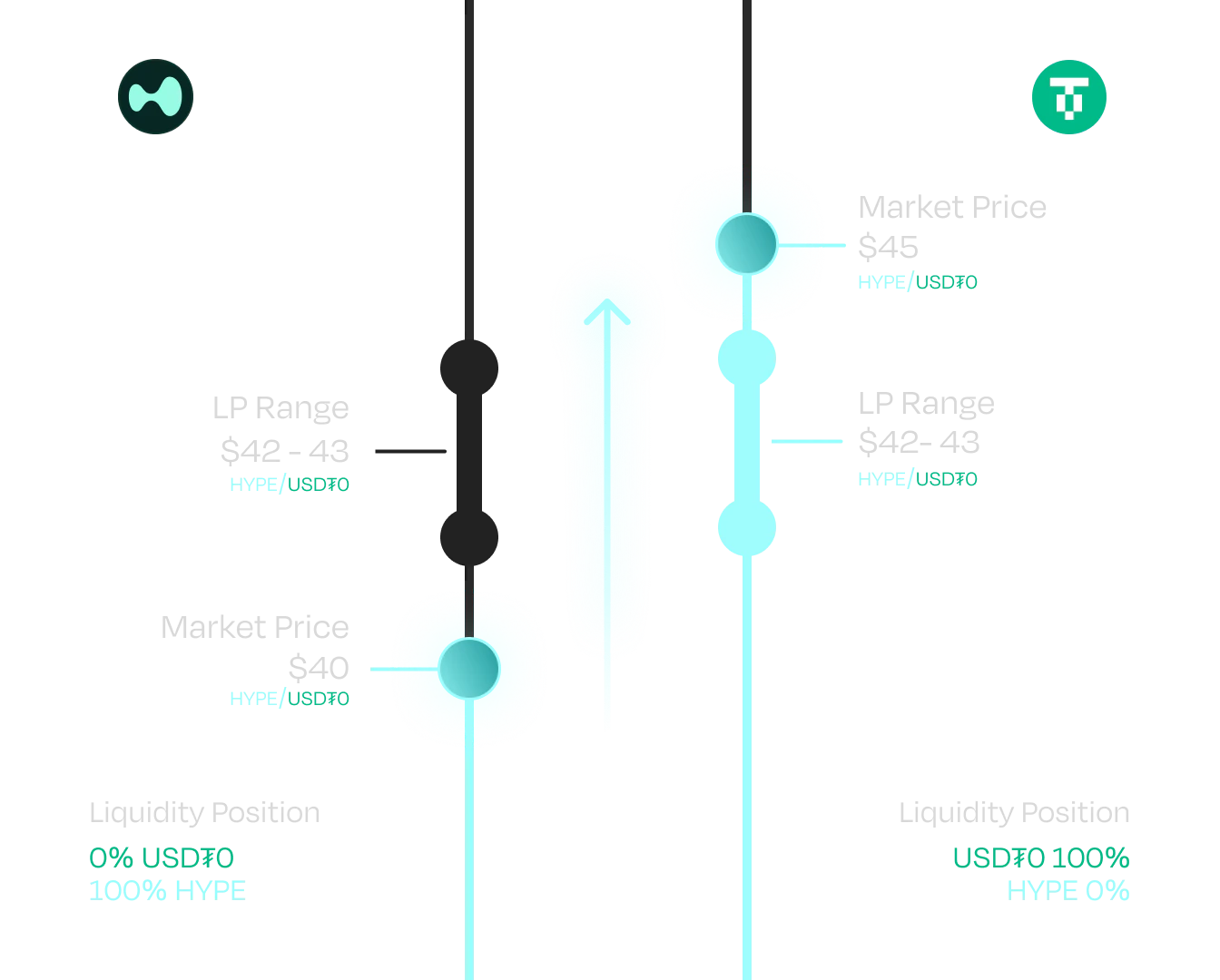 When the current Tick of the Pool moves across the Position, the ratio of `token0` and `token1` will change, and ultimately inverse if the current Tick moves out of the position on the other side.
We will utilise this behaviour to provide liquidity with `token1` and withdraw the position when it has been converted to `token0`.
## Calculating the Tick Range
Our goal for this guide is to create a [Take Profit Order](../../../../concepts/protocol/range-orders.md#take-profit-orders) that trades `token0` for `token1` when the Price of `token0` increases by 5%.
To create our Position, we need to first decide the Tick Range that we want to provide liquidity in.
### Upper Tick
We [create a Pool](./02-pool-data) that represents the V3 Pool we are interacting with and get the `token0Price`.
We won't need full tick data in this example.
```typescript theme={null}
import { Pool } from '@kingdomdotone/v3-sdk'
...
const pool = new Pool(token0, token1, fee, sqrtPriceX96, liquidity, tickCurrent)
const currentPrice = pool.token0Price
```
Next we increase the `Price` by 5%. We create a new Price with a numerator 5% higher than our current Price:
```typescript theme={null}
import { Price, Fraction } from '@uniswap/sdk-core'
const targetFraction = Price.asFraction.multiply(new Fraction(100 + 5, 100))
const targetPrice = new Price(
currentPrice.baseCurrency,
currentPrice.quoteCurrency,
targetFraction.denominator,
targetFraction.numerator
)
```
Be aware that the `numerator` and `denominator` parameters are ordered differently in the `Fraction` and `Price` constructor.
We have calculated our target Price but we still need to find the **nearest usable tick** to create our Position.
As Positions can only start and end at initializable Ticks of the Pool, so we can only create a Range Order to a Price that exactly matches an initializable Tick.
We use the `priceToClosestTick` function to find the closest tick to our targetPrice.
We then use the `nearestUsableTick` function to find the closest initializable Tick for the `tickSpacing` of the `Pool`.
```typescript theme={null}
import {priceToClosestTick, nearestUsableTick} from '@kingdomdotone/v3-sdk'
let targetTick = nearestUsableTick(
priceToClosestTick(targetPrice),
pool.tickSpacing
)
```
This nearest Tick will most likely not **exactly** match our Price target.
Depending on our personal preferences we can either err on the higher or lower side of our target by adding or subtracting the `tickSpacing` if the initializable Tick is lower or higher than the theoretically closest Tick.
### Lower Tick
We now find the lower Tick by subtracting the tickSpacing from the upper Tick:
```typescript theme={null}
let lowerTick = targetTick - pool.tickSpacing
```
If the price difference is too low, the lower tick may be left of the current Tick of the Pool.
In that case we would not be able to provide single side liquidity.
We can either throw an Error or increase our Position by one Tick.
```typescript theme={null}
if (tickLower <= pool.tickCurrent) {
tickLower += pool.tickSpacing
targetTick += pool.tickSpacing
}
```
We now have a lower and upper Tick for our Position, next we need to construct and mint it.
## Creating the Single Side Liquidity Position
We will use the `RamsesV3PositionManager` and `Position` classes from the `v3-sdk` to construct our position. We then use an **etherJS** wallet to mint our Position onchain.
If you are not familiar with liquidity Positions, check out the [liquidity position guides](../liquidity/01-position-data).
### Minting the Position
We create a `Position` object with our ticks and the amount of tokens we want to deposit:
```typescript theme={null}
import { Position } from '@kingdomdotone/v3-sdk'
const position = Position.fromAmount0({
pool: pool,
tickLower: tickLower,
tickUpper: targetTick,
amount0: amount,
useFullPrecision: true
})
```
Before we mint our position, we need to give the `RamsesV3PositionManager` Contract an approval to transfer our tokens.
We can find the Contract address from the [Ramses contract addresses](https://docs.ramses.xyz/security/contract-addresses) or the [Uniswap GitHub](https://github.com/Uniswap/v3-periphery/blob/main/deploys) for Ethereum mainnet forks.
For local development, the contract address is the same as the network we are forking from.
So if we are using a local fork of mainnet like described in the [Local development guide](../02-local-development), the contract address would be the same as on mainnet.
```typescript theme={null}
import ethers from 'ethers'
const provider = new ethers.providers.JsonRpcProvider(rpcUrl)
const wallet = new ethers.Wallet(privateKey, provider)
const tokenContract = new ethers.Contract(
pool.token0.address,
ERC20_ABI,
wallet
)
await tokenContract['approve'](
NONFUNGIBLE_POSITION_MANAGER_CONTRACT_ADDRESS,
ethers.BigNumber.from(amount)
)
```
Once we have our approval, we create the calldata for the **Mint** call using the `RamsesV3PositionManager`:
```typescript theme={null}
import {MintOptions, RamsesV3PositionManager}
import { Percent } from '@uniswap/sdk-core'
const mintOptions: MintOptions = {
recipient: wallet.address,
deadline: Math.floor(Date.now() / 1000) + 60 * 20,
slippageTolerance: new Percent(50, 10_000),
}
const { calldata, value } = RamsesV3PositionManager.addCallParameters(
order.position,
mintOptions
)
```
We can populate our mint transaction and send it with our wallet:
```typescript theme={null}
const transaction = {
data: calldata,
to: NONFUNGIBLE_POSITION_MANAGER_CONTRACT_ADDRESS,
value: ethers.BigNumber.from(value),
from: address,
maxFeePerGas: MAX_FEE_PER_GAS,
maxPriorityFeePerGas: MAX_PRIORITY_FEE_PER_GAS,
}
const txRes = await wallet.sendTransaction(transaction)
```
You can find full code examples for these code snippets in [`range-order.ts`](https://github.com/uniswap/examples/blob/main/v3-sdk/range-order/src/libs/range-order.ts).
### Getting the tokenId
We want to read the response to our `Mint` function call to get **the position id**.
We will need the positionId to fetch the Position Info from the NFTPositionManager contract.
We wait for the transaction receipt and fetch the result using `trace_transaction`:
```typescript theme={null}
let receipt = null
let mintCallOutput
while (receipt === null) {
try {
receipt = await provider.getTransactionReceipt(txRes.hash)
if (receipt === null) {
continue
} else {
const callTraces = await provider.send('trace_transaction', [
txRes.hash
])
mintCallOutput = callTraces[0].result.output
}
} catch (e) {
break
}
}
```
Your Node provider may not support this call. In that case you can also call the RamsesV3PositionManager Contract with the wallet address and identify the Range Order Position manually:
```typescript theme={null}
const mintCallOutput = await wallet.call(transaction)
```
We get a raw byte string as a return value from this function and have to parse it ourselves.
We decode the result with the **ethers AbiCoder**. The solidity function has this signature:
```solidity theme={null}
function mint(
struct IRamsesV3PositionManager.MintParams params
) external returns (uint256 tokenId, uint128 liquidity, uint256 amount0, uint256 amount1)
```
So we need the first parameter to get the `tokenId`:
```typescript theme={null}
const decodedOutput = ethers.utils.defaultAbiCoder.decode(
['tuple(uint256, uint128, uint256, uint256)'],
mintCallOutput
)[0]
const tokenId = decodedOutput.toString()
```
Ethers handles the string decoding of the byte string we got and parses it to its internal datatypes.
The decodedOutput we get from the AbiCoder is a `ethers.Bignumber` so we need to cast it to a string to use it with the SDK.
We have created our Range Order Position, now we need to monitor it.
In the [code example](https://github.com/uniswap/examples/blob/main/v3-sdk/range-order/src/libs/range-order.ts#L180) we use `wallet.call` to get the position id.
`call` and `trace_call` both simulate a transaction on the connected node and return the expected output, `trace_call` gives us a much more detailed output though.
Depending on the use case, either can be the better choice.
In a production environment you would prefer to wait for the `transactionReceipt` like described earlier to ensure the transaction was actaully included in the blockchain.
## Observing the Price
We need to observe the price of the Pool and withdraw our Position once the `tickCurrent` has moved across our Position.
We use **ethers JS** to watch for new blocks and fetch the latest Pool data:
```typescript theme={null}
provider.on('block', refreshPool())
function refreshPool() {
... // construct Pool contract
const slot0 = await poolContract.slot0()
const tickCurrent = slot0.tick
}
```
It is not necessary to calculate the Price from the tick we fetched, as executing the limit order is dependent on the tick range we defined and not the Price from which we calculated it.
```typescript theme={null}
if (tickCurrent > targetTick) {
// Withdraw position
}
```
We check if the tick has crossed our position, and if so we withdraw the Position.
## Closing the Limit Order
We call the RamsesV3PositionManager Contract with the `tokenId` to get all info of our position as we may have gotten fees from trades on the Pool:
```typescript theme={null}
import INON_FUNGIBLE_POSITION_MANAGER from '@uniswap/v3-periphery/artifacts/contracts/RamsesV3PositionManager.sol/RamsesV3PositionManager.json'
const positionManagerContract = new ethers.Contract(
NONFUNGIBLE_POSITION_MANAGER_CONTRACT_ADDRESS,
INONFUNGIBLE_POSITION_MANAGER.abi,
provider
)
const positionInfo = await positionManagerContract.positions(tokenId)
```
We use the `RamsesV3PositionManager`, the `pool`, `positionInfo` and `tokenId` to create call parameter for a `decreaseLiquidity` call.
We start with creating `CollectOptions`:
```typescript theme={null}
import { Percent, CurrencyAmount } from '@uniswap/sdk-core'
import { CollectOptions, RemoveLiquidityOptions } from '@kingdomdotone/v3-sdk'
import JSBI from 'jsbi'
const collectOptions: Omit = {
expectedCurrencyOwed0: CurrencyAmount.fromRawAmount(
pool.token0,
JSBI.BigInt(positionInfo.tokensOwed0.toString())
),
expectedCurrencyOwed1: CurrencyAmount.fromRawAmount(
pool.token1,
JSBI.BigInt(positionInfo.tokensOwed1.toString())
),
recipient: wallet.address,
}
```
Next we create `RemoveLiquidityOptions`. We remove all our liquidity so we set liquidityPercentage to `1`:
```typescript theme={null}
const removeLiquidityOptions: RemoveLiquidityOptions = {
deadline: Math.floor(Date.now() / 1000) + 60 * 20,
slippageTolerance: new Percent(50, 10_000),
tokenId,
// percentage of liquidity to remove
liquidityPercentage: new Percent(1),
collectOptions,
}
```
We create a new `Position` object from the updated `positionInfo` info we fetched:
```typescript theme={null}
const updatedPosition = new Position{
pool,
liquidity: JSBI.BigInt(currentPositionInfo.liquidity.toString()),
tickLower: currentPositionInfo.tickLower,
tickUpper: currentPositionInfo.tickUpper,
}
```
We have everything to create our calldata now and are ready to make our Contract call:
```typescript theme={null}
const { calldata, value } = RamsesV3PositionManager.removeCallParameters(
updatedPosition,
removeLiquidityOptions
)
const transaction = {
data: calldata,
to: NONFUNGIBLE_POSITION_MANAGER_CONTRACT_ADDRESS,
value: value,
from: address,
maxFeePerGas: MAX_FEE_PER_GAS,
maxPriorityFeePerGas: MAX_PRIORITY_FEE_PER_GAS,
}
const result = await wallet.sendTransaction(transaction)
```
Our liquidity position is removed and we receive `token1` at the Price we have specified.
We have successfully executed a range order.
## Caveats
Executing a range order has certain limitations that may have become obvious during the course of this guide.
* If the price of the Pool drops below `tickUpper` while we already decided to withdraw our liquidity our order may fail and we either receive `token0`, `token0` and `token1` or our transaction fails depending on our exact implementation.
* Range Orders can only be created between initializable ticks and may not exactly represent our limit order Price-Target.
* Depending on the price ratio of the tokens in the Pool the minimum price difference to the current price may be significant.
* The tokens received are the average between the Price of `tickUpper` and `tickLower` of the Range order. This can be a significant difference for Pools with a tickCurrent far from 0, for example tokens with different decimals (WETH/ USDT, WETH/USDC). The example showcases this behaviour well with the default configuration.
## Next Steps
This guide showcases everything you need to implement Range Orders on your own, but only demonstrates creating a Take Profit order in `token0` to `token1` direction.
Consider implementing Buy Limit orders as described in the [Range Orders concept page](../../../../concepts/protocol/range-orders.md#buy-limit-orders).
This is currently the last guide in the `v3-sdk` series. Consider joining the [Ramses Discord](https://discord.gg/ramses) or checkout the official [GitHub](https://github.com/RamsesExchange) to learn more about Ramses.
When the current Tick of the Pool moves across the Position, the ratio of `token0` and `token1` will change, and ultimately inverse if the current Tick moves out of the position on the other side.
We will utilise this behaviour to provide liquidity with `token1` and withdraw the position when it has been converted to `token0`.
## Calculating the Tick Range
Our goal for this guide is to create a [Take Profit Order](../../../../concepts/protocol/range-orders.md#take-profit-orders) that trades `token0` for `token1` when the Price of `token0` increases by 5%.
To create our Position, we need to first decide the Tick Range that we want to provide liquidity in.
### Upper Tick
We [create a Pool](./02-pool-data) that represents the V3 Pool we are interacting with and get the `token0Price`.
We won't need full tick data in this example.
```typescript theme={null}
import { Pool } from '@kingdomdotone/v3-sdk'
...
const pool = new Pool(token0, token1, fee, sqrtPriceX96, liquidity, tickCurrent)
const currentPrice = pool.token0Price
```
Next we increase the `Price` by 5%. We create a new Price with a numerator 5% higher than our current Price:
```typescript theme={null}
import { Price, Fraction } from '@uniswap/sdk-core'
const targetFraction = Price.asFraction.multiply(new Fraction(100 + 5, 100))
const targetPrice = new Price(
currentPrice.baseCurrency,
currentPrice.quoteCurrency,
targetFraction.denominator,
targetFraction.numerator
)
```
Be aware that the `numerator` and `denominator` parameters are ordered differently in the `Fraction` and `Price` constructor.
We have calculated our target Price but we still need to find the **nearest usable tick** to create our Position.
As Positions can only start and end at initializable Ticks of the Pool, so we can only create a Range Order to a Price that exactly matches an initializable Tick.
We use the `priceToClosestTick` function to find the closest tick to our targetPrice.
We then use the `nearestUsableTick` function to find the closest initializable Tick for the `tickSpacing` of the `Pool`.
```typescript theme={null}
import {priceToClosestTick, nearestUsableTick} from '@kingdomdotone/v3-sdk'
let targetTick = nearestUsableTick(
priceToClosestTick(targetPrice),
pool.tickSpacing
)
```
This nearest Tick will most likely not **exactly** match our Price target.
Depending on our personal preferences we can either err on the higher or lower side of our target by adding or subtracting the `tickSpacing` if the initializable Tick is lower or higher than the theoretically closest Tick.
### Lower Tick
We now find the lower Tick by subtracting the tickSpacing from the upper Tick:
```typescript theme={null}
let lowerTick = targetTick - pool.tickSpacing
```
If the price difference is too low, the lower tick may be left of the current Tick of the Pool.
In that case we would not be able to provide single side liquidity.
We can either throw an Error or increase our Position by one Tick.
```typescript theme={null}
if (tickLower <= pool.tickCurrent) {
tickLower += pool.tickSpacing
targetTick += pool.tickSpacing
}
```
We now have a lower and upper Tick for our Position, next we need to construct and mint it.
## Creating the Single Side Liquidity Position
We will use the `RamsesV3PositionManager` and `Position` classes from the `v3-sdk` to construct our position. We then use an **etherJS** wallet to mint our Position onchain.
If you are not familiar with liquidity Positions, check out the [liquidity position guides](../liquidity/01-position-data).
### Minting the Position
We create a `Position` object with our ticks and the amount of tokens we want to deposit:
```typescript theme={null}
import { Position } from '@kingdomdotone/v3-sdk'
const position = Position.fromAmount0({
pool: pool,
tickLower: tickLower,
tickUpper: targetTick,
amount0: amount,
useFullPrecision: true
})
```
Before we mint our position, we need to give the `RamsesV3PositionManager` Contract an approval to transfer our tokens.
We can find the Contract address from the [Ramses contract addresses](https://docs.ramses.xyz/security/contract-addresses) or the [Uniswap GitHub](https://github.com/Uniswap/v3-periphery/blob/main/deploys) for Ethereum mainnet forks.
For local development, the contract address is the same as the network we are forking from.
So if we are using a local fork of mainnet like described in the [Local development guide](../02-local-development), the contract address would be the same as on mainnet.
```typescript theme={null}
import ethers from 'ethers'
const provider = new ethers.providers.JsonRpcProvider(rpcUrl)
const wallet = new ethers.Wallet(privateKey, provider)
const tokenContract = new ethers.Contract(
pool.token0.address,
ERC20_ABI,
wallet
)
await tokenContract['approve'](
NONFUNGIBLE_POSITION_MANAGER_CONTRACT_ADDRESS,
ethers.BigNumber.from(amount)
)
```
Once we have our approval, we create the calldata for the **Mint** call using the `RamsesV3PositionManager`:
```typescript theme={null}
import {MintOptions, RamsesV3PositionManager}
import { Percent } from '@uniswap/sdk-core'
const mintOptions: MintOptions = {
recipient: wallet.address,
deadline: Math.floor(Date.now() / 1000) + 60 * 20,
slippageTolerance: new Percent(50, 10_000),
}
const { calldata, value } = RamsesV3PositionManager.addCallParameters(
order.position,
mintOptions
)
```
We can populate our mint transaction and send it with our wallet:
```typescript theme={null}
const transaction = {
data: calldata,
to: NONFUNGIBLE_POSITION_MANAGER_CONTRACT_ADDRESS,
value: ethers.BigNumber.from(value),
from: address,
maxFeePerGas: MAX_FEE_PER_GAS,
maxPriorityFeePerGas: MAX_PRIORITY_FEE_PER_GAS,
}
const txRes = await wallet.sendTransaction(transaction)
```
You can find full code examples for these code snippets in [`range-order.ts`](https://github.com/uniswap/examples/blob/main/v3-sdk/range-order/src/libs/range-order.ts).
### Getting the tokenId
We want to read the response to our `Mint` function call to get **the position id**.
We will need the positionId to fetch the Position Info from the NFTPositionManager contract.
We wait for the transaction receipt and fetch the result using `trace_transaction`:
```typescript theme={null}
let receipt = null
let mintCallOutput
while (receipt === null) {
try {
receipt = await provider.getTransactionReceipt(txRes.hash)
if (receipt === null) {
continue
} else {
const callTraces = await provider.send('trace_transaction', [
txRes.hash
])
mintCallOutput = callTraces[0].result.output
}
} catch (e) {
break
}
}
```
Your Node provider may not support this call. In that case you can also call the RamsesV3PositionManager Contract with the wallet address and identify the Range Order Position manually:
```typescript theme={null}
const mintCallOutput = await wallet.call(transaction)
```
We get a raw byte string as a return value from this function and have to parse it ourselves.
We decode the result with the **ethers AbiCoder**. The solidity function has this signature:
```solidity theme={null}
function mint(
struct IRamsesV3PositionManager.MintParams params
) external returns (uint256 tokenId, uint128 liquidity, uint256 amount0, uint256 amount1)
```
So we need the first parameter to get the `tokenId`:
```typescript theme={null}
const decodedOutput = ethers.utils.defaultAbiCoder.decode(
['tuple(uint256, uint128, uint256, uint256)'],
mintCallOutput
)[0]
const tokenId = decodedOutput.toString()
```
Ethers handles the string decoding of the byte string we got and parses it to its internal datatypes.
The decodedOutput we get from the AbiCoder is a `ethers.Bignumber` so we need to cast it to a string to use it with the SDK.
We have created our Range Order Position, now we need to monitor it.
In the [code example](https://github.com/uniswap/examples/blob/main/v3-sdk/range-order/src/libs/range-order.ts#L180) we use `wallet.call` to get the position id.
`call` and `trace_call` both simulate a transaction on the connected node and return the expected output, `trace_call` gives us a much more detailed output though.
Depending on the use case, either can be the better choice.
In a production environment you would prefer to wait for the `transactionReceipt` like described earlier to ensure the transaction was actaully included in the blockchain.
## Observing the Price
We need to observe the price of the Pool and withdraw our Position once the `tickCurrent` has moved across our Position.
We use **ethers JS** to watch for new blocks and fetch the latest Pool data:
```typescript theme={null}
provider.on('block', refreshPool())
function refreshPool() {
... // construct Pool contract
const slot0 = await poolContract.slot0()
const tickCurrent = slot0.tick
}
```
It is not necessary to calculate the Price from the tick we fetched, as executing the limit order is dependent on the tick range we defined and not the Price from which we calculated it.
```typescript theme={null}
if (tickCurrent > targetTick) {
// Withdraw position
}
```
We check if the tick has crossed our position, and if so we withdraw the Position.
## Closing the Limit Order
We call the RamsesV3PositionManager Contract with the `tokenId` to get all info of our position as we may have gotten fees from trades on the Pool:
```typescript theme={null}
import INON_FUNGIBLE_POSITION_MANAGER from '@uniswap/v3-periphery/artifacts/contracts/RamsesV3PositionManager.sol/RamsesV3PositionManager.json'
const positionManagerContract = new ethers.Contract(
NONFUNGIBLE_POSITION_MANAGER_CONTRACT_ADDRESS,
INONFUNGIBLE_POSITION_MANAGER.abi,
provider
)
const positionInfo = await positionManagerContract.positions(tokenId)
```
We use the `RamsesV3PositionManager`, the `pool`, `positionInfo` and `tokenId` to create call parameter for a `decreaseLiquidity` call.
We start with creating `CollectOptions`:
```typescript theme={null}
import { Percent, CurrencyAmount } from '@uniswap/sdk-core'
import { CollectOptions, RemoveLiquidityOptions } from '@kingdomdotone/v3-sdk'
import JSBI from 'jsbi'
const collectOptions: Omit = {
expectedCurrencyOwed0: CurrencyAmount.fromRawAmount(
pool.token0,
JSBI.BigInt(positionInfo.tokensOwed0.toString())
),
expectedCurrencyOwed1: CurrencyAmount.fromRawAmount(
pool.token1,
JSBI.BigInt(positionInfo.tokensOwed1.toString())
),
recipient: wallet.address,
}
```
Next we create `RemoveLiquidityOptions`. We remove all our liquidity so we set liquidityPercentage to `1`:
```typescript theme={null}
const removeLiquidityOptions: RemoveLiquidityOptions = {
deadline: Math.floor(Date.now() / 1000) + 60 * 20,
slippageTolerance: new Percent(50, 10_000),
tokenId,
// percentage of liquidity to remove
liquidityPercentage: new Percent(1),
collectOptions,
}
```
We create a new `Position` object from the updated `positionInfo` info we fetched:
```typescript theme={null}
const updatedPosition = new Position{
pool,
liquidity: JSBI.BigInt(currentPositionInfo.liquidity.toString()),
tickLower: currentPositionInfo.tickLower,
tickUpper: currentPositionInfo.tickUpper,
}
```
We have everything to create our calldata now and are ready to make our Contract call:
```typescript theme={null}
const { calldata, value } = RamsesV3PositionManager.removeCallParameters(
updatedPosition,
removeLiquidityOptions
)
const transaction = {
data: calldata,
to: NONFUNGIBLE_POSITION_MANAGER_CONTRACT_ADDRESS,
value: value,
from: address,
maxFeePerGas: MAX_FEE_PER_GAS,
maxPriorityFeePerGas: MAX_PRIORITY_FEE_PER_GAS,
}
const result = await wallet.sendTransaction(transaction)
```
Our liquidity position is removed and we receive `token1` at the Price we have specified.
We have successfully executed a range order.
## Caveats
Executing a range order has certain limitations that may have become obvious during the course of this guide.
* If the price of the Pool drops below `tickUpper` while we already decided to withdraw our liquidity our order may fail and we either receive `token0`, `token0` and `token1` or our transaction fails depending on our exact implementation.
* Range Orders can only be created between initializable ticks and may not exactly represent our limit order Price-Target.
* Depending on the price ratio of the tokens in the Pool the minimum price difference to the current price may be significant.
* The tokens received are the average between the Price of `tickUpper` and `tickLower` of the Range order. This can be a significant difference for Pools with a tickCurrent far from 0, for example tokens with different decimals (WETH/ USDT, WETH/USDC). The example showcases this behaviour well with the default configuration.
## Next Steps
This guide showcases everything you need to implement Range Orders on your own, but only demonstrates creating a Take Profit order in `token0` to `token1` direction.
Consider implementing Buy Limit orders as described in the [Range Orders concept page](../../../../concepts/protocol/range-orders.md#buy-limit-orders).
This is currently the last guide in the `v3-sdk` series. Consider joining the [Ramses Discord](https://discord.gg/ramses) or checkout the official [GitHub](https://github.com/RamsesExchange) to learn more about Ramses.